
With the Data retention add-on, you can automatically cleardata from selected fields in a form after a defined period of time. The feature is designed to simplify the handling of, for example, personal data, data minimization, and storage limitation, but it can also be used for other types of information that should not be stored longer than necessary.
Data retention is particularly useful when you want to ensure that specific information is removed after a certain period without manual handling. This may be relevant, for example, in GDPR compliance, when personal data no longer needs to remain in a case, or when different types of information should be deleted depending on how long a case has existed or what status it has.
Install the Data retention add-on
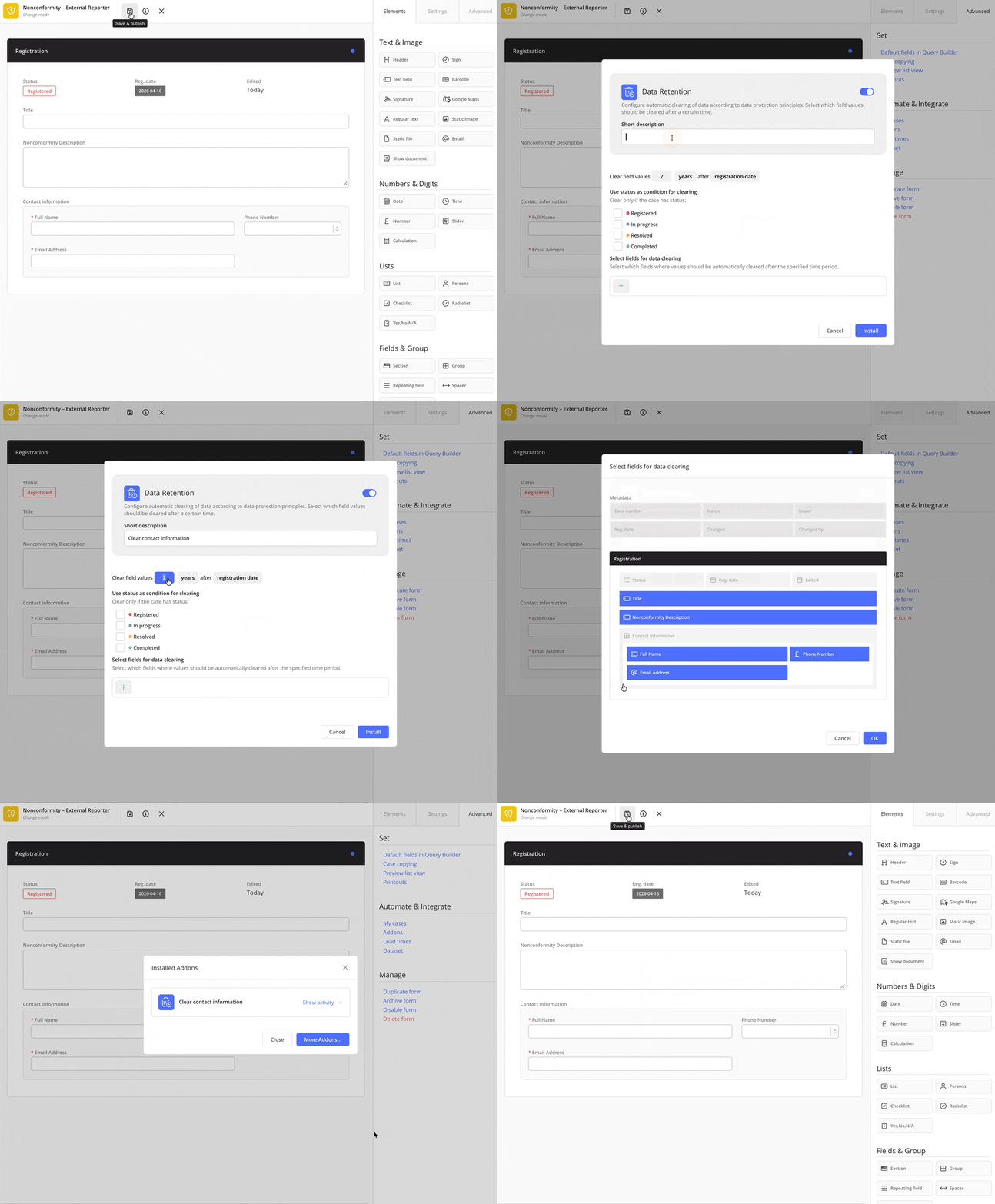
Data retention is an add-on that is managed, just like other add-ons, in each form via the Advanced tab under the Automate & Integrate section.
To install the add-on:
-
Go to the relevant form.
-
Open the Advanced tab and then click Addons under the Automate & Integrate section.
-
If you already have other add-ons configured, click More addons.
-
Click Install on the Data Retention addon.
How Data retention works
Once the addon is installed, you start by defining the conditions under which data should be cleared and then select which fields will be affected. In practice, this means first configuring the retention rules – the time period, which date should be used as the starting point, and which case statuses are required for data to be cleared – and then choosing the fields in the form that will be processed according to these rules.
 |
Specify when data should be cleared
The retention period can be set in months or years. This allows you to decide whether data should be cleared after a certain number of months or after a certain number of years, depending on how long the information may or needs to be stored according to your internal guidelines or external requirements (such as laws, contracts, or certification standards).
The shortest possible retention period is 1 month. Shorter intervals, such as days or weeks, are not supported . For example, if you specify 1 month, the data will be cleared no earlier than one month after the date used as the basis for the calculation.
The retention period can be calculated based on:
-
Registration date – the time is counted from the date the case was created in the system. This is suitable when all information in the case should be handled in the same way, regardless of whether it has been changed or not..
-
Modification date– the time is counted from the most recent change made to the case. This is useful when you want to keep information for as long as the case is active and only clear it after a certain period of inactivity.
By choosing the appropriate starting point, you can tailor the retention to how your cases are actually handled in practice – either based on how old they are or how long they have been inactive.
Finally, you also need to specify one or more statuses that a case must have for data to be cleared, for example only when the case has the status Closed. This ensures that information is only removed from completed cases, and not from cases that are still in progress or under review.
Field types that can be cleared
Data retention can be applied to the following field types:
- Text fields – for example free‑text descriptions, comments, notes, or other information entered manually. This is often where personal data, sensitive details, or other detailed information may appear, which makes it especially important to control how long the data is stored.
- Number fields – for example order numbers, customer numbers, internal references, measurements, or other numeric values. These may need to be cleared when they are no longer relevant, such as after completed assignments or when traceability is no longer required.
- Email fields – fields where email addresses are stored, whether they relate to employees, customers, suppliers, or other contacts. Here, Data retention helps you meet data minimization requirements and avoid storing personal data longer than necessary.
❗️When data is cleared, the value is stored in encrypted form for 90 days so that an authorized administrator can view and, if necessary, restore it. There is a technical limit of 4 kilobytes per field and clearing event, which corresponds to roughly 4,000 characters of plain text – about half to a full A4 page. If a field contains more than 4 kilobytes of information, the value will not be cleared, as it cannot be stored in the encrypted vault.
It is also possible to clear data from the field types mentioned above when they are used inside repeating fields. This means you can apply Data retention even where these field types appear on multiple rows, for example when registering several actions, contacts, or products within the same case. Keep in mind, however, that the field you select for clearing will be cleared in every row of the repeating field as soon as the specified date interval and chosen status are met.
By limiting the function to these field types, you ensure that data is cleared in a controlled and predictable way, while also getting targeted support for managing exactly the kinds of information that are most often subject to retention rules and privacy requirements.
The Data retention function cannot be used on the field type persons lists. Persons lists are handled in a specific way in the system, as they often contain structured personal data linked to permissions, roles, training, or other HR and quality contexts.
For anonymizing person lists, please refer instead to the article on anonymization, which explains how to replace personal data with anonymized values and outlines the steps in the anonymization process.
What happens when data is cleared from a field?
- Cleared fields are marked and locked
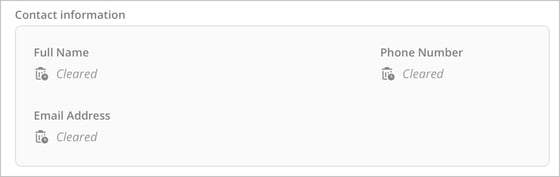
When Data retention is executed, all content in the selected fields is removed in line with the rules you have defined. The fields themselves remain in the form but without their previous values. When reviewing or editing the case, an icon and the label Cleared are shown in the field, making it easy for reviewers and administrators to see that information once existed there but has been deliberately removed via Data retention.
A field that has been cleared is also locked for editing, meaning no new information can be added to it. (The only exception is if the information is restored within the period during which recovery is still possible.)
-
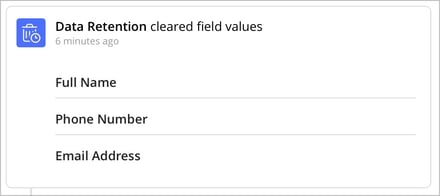
The Show activity log is updated
In Show activity, the system records that a clearing action has been performed and which fields were affected. Previous events related to the cleared field are also stripped of their values and instead display “🗑️ Cleared”. This means you can still see that information once existed in the field, when it was registered or changed, and when the clearing took place – but not what the content was. In this way, traceability of what has been documented is maintained, while the actual information is no longer accessible.
- The system treats the field as "filled in"
After clearing, the system continues to regard the field as filled in. Features such as Hidden until, My cases, Done when, Status, conditional events (e.g. send messages, new case, and outgoing webhooks), and search queries will therefore handle the field as completed even after the data has been removed.
Mandatory fields can also be cleared with Data retention. Because the field is locked and still counted as completed, the case can be saved even if the field is required and no longer contains its original information.
Temporary storage and option to restore data
When information is cleared from a case, it is not permanently deleted at the same moment. Instead, the value is stored in encrypted form for 90 days from the time of clearing. During this period, an administrator can, via the add-on, view the information and, if needed, restore it to the case. This provides a safety margin if something is cleared by mistake, or if you later need to verify what was entered in a specific field.
❗️When the 90‑day period has passed, the encrypted copy is permanently deleted, and it is no longer possible to restore the information – not even for AM System as the system provider. At that point, the Data retention action becomes irreversible, which is important from both a privacy and compliance perspective, for example in relation to data minimization and storage limitation.
Also be aware that if the form, the field, or the specific row in a repeating field has been deleted, the information can no longer be restored.
How to restore cleared information
You can restore cleared information as long as this is done within 90 days from when the data was removed from the case. This action can only be performed by a user with administrator rights in Cases, or a user whose profile includes the permission Ability to change form. Note that restoration is only possible if both the form and the specific field still exist. If the field was part of a repeating field, the specific row in that repeating field must also still be present in order for the information to be restored.
To view or restore a cleared value:
-
Open the add-on that performed the clearing.
-
2. Click Show activity.

-
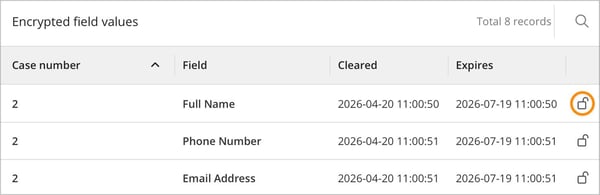
If there is cleared information that has not yet been permanently deleted, it appears in the list.
For each entry, you can see the case number, field name, when the information was cleared, and when it will be permanently deleted.
To view or restore the information for a specific case and field, click the padlock icon on the corresponding row. A view then opens where you can see the value that previously existed in the field and confirm that it should be restored to the case. The value is not written back to the case until you have confirmed the action, at which point it becomes visible again to authorized users.
If you see several entries with the same field name and case number, this may be because the field is part of a repeating field.
When a value has been restored, the corresponding row is removed from the list so that only values that can still be restored within the 90‑day period are shown.
What happens when information is restored?
When information is restored, this is automatically logged in Show activity, together with details of which field was affected, who performed the action, and when the restoration took place. This ensures clear traceability even after the value has been written back to the case. Note that earlier values that once existed in a restored field are not shown in Show activity; the view will continue to indicate that the field has been cleared with the label “🗑️ Cleared”.
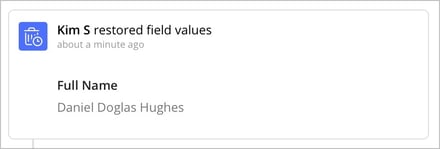
The restored value is then handled like any other field in the case. The field is unlocked, and the information becomes fully visible in the form and searchable in relevant views and lists for all users who have access to the case and that field. This means the restored data can be used in your ongoing work just as before it was cleared.
💬 Keep in mind that restoring data does not change the rules you have configured in the Data retention addon. If the addon is still active and the same settings apply, the restored information may be cleared again the next time the conditions are met. Before you restore any data, it can therefore be wise to review the retention rules – for example by extending the retention period, adjusting the conditions, or temporarily disabling the clearing – so that the information is not removed again immediately.
Important information about the Data retention function
- Clearing also runs on inactive and archived forms, as well as on hidden fields
Data retention is executed automatically on all cases in forms where the addon is active, even if the form itself is inactive or archived. The rules also apply to fields that are hidden using the Hidden until property. In other words, the retention settings remain in effect until you disable the function.
If you do not want cases in inactive or archived forms to be affected by Data retention, you need to manually deactivate or remove the addon from those forms. - Duplicating forms
If a form is duplicated, all configured addons – including the Data retention addon – are automatically copied to the new form. If you do not want the duplicated form to use Data retention, you need to deactivate or remove the addon in that form.
When a form is duplicated together with its cases, no information from the encrypted vault is transferred to the new copy. This applies regardless of whether the data is still within the 90‑day recovery period or not. The duplicated form and its cases therefore have no connection to previously cleared values. However, all fields that were cleared and included in the duplication will remain cleared, locked, and labeled with “🗑️ Cleared,” just as in the original form. -
The case modification date is not updated when data is cleared
When Data retention runs, the case’s modification date is not changed. In lists and overviews, the case therefore still appears as last modified at the time it was most recently edited or saved manually, even if one or more fields have been cleared after that. The purpose is to ensure that automatic, scheduled clearings do not affect the timestamp many users rely on to assess when a case was last actively handled, for example in follow‑up, prioritization, or reporting.
It is therefore important to be aware that a case may have had information cleared without this being visible in the modification date. To see when clearing has actually taken place, you instead need to use Show activity, where each clearing is logged with date, time, field, and which Data retention rule performed the action. - Maximum size of 4 kilobytes per cleared value
When data is cleared, the value is stored in encrypted form for 90 days so that an authorized administrator can view and, if necessary, restore it. There is a technical limit of 4 kilobytes per field and clearing event, corresponding to roughly 4,000 characters of plain text (about half to a full A4 page). If a field contains more information than this, the value cannot be stored in the encrypted vault and the field will therefore not be cleared.
Therefore, make sure that fields covered by Data retention are not used for very large amounts of text, such as long descriptions or pasted‑in documents. - Clearing data from fields in repeating sections
It is possible to clear data from fields that are placed inside repeating fields. Keep in mind, however, that the selected field will be cleared in every row of the repeating field as soon as the specified time interval and chosen status are met. -
Nightly execution of Data retention
The system evaluates which data should be cleared once every day, at night in Central European Time (CET). During this run, all relevant cases are compared against the retention rules you have configured, and any fields that meet the conditions are cleared automatically without anyone needing to be logged in. Running the process at night reduces the impact on performance during working hours. Note that changes you make to the retention settings normally take effect from the next nightly run. - You can create multiple Data retention configurations in the same form
Each configuration is set up as its own “rule set” with specific conditions and selected fields. For example, you might clear personal data in email fields after 12 months, free‑text comments after 2 years, and number fields 3 years after the last change once the case has status Closed.
By running several Data retention rules in parallel, you can fine‑tune how different types of information are handled over time – based on both legal requirements and internal guidelines – without having to apply the same logic to every field in the form. -
In the search results list view, it is not shown that a field has been cleared
Instead, the field appears as empty with a dash (-), in the same way as other fields without content. -
Uninstalling a Data retention addon
You cannot uninstall a Data retention addon as long as there is encrypted information about cleared values remaining in the Show activity list. However, you can deactivate the addon. This stops all new clearings, and after 90 days the encrypted information is permanently deleted, the Show activity list is emptied, and the addon can then be uninstalled.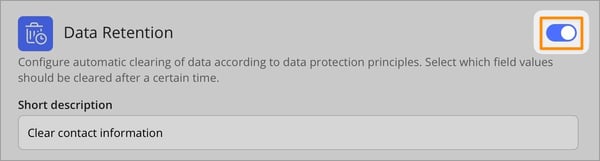
Before you start using Data retention
Data retention is a powerful function and should be configured carefully. Before activating it, we recommend that you ensure:
-
that you have selected the correct fields
-
that the retention period matches your needs and any applicable storage requirements
-
that you have decided whether clearing should depend on the case status
-
that you are aware that cleared fields are locked
-
that you know recovery is only possible for 90 days; after that, the information cannot be restored, neither by you nor by AM System as the system provider
-
that you take into account the technical limit for how much information can be encrypted: only values up to 4 kilobytes (about 4,000 characters, roughly half to one A4 page) can be cleared; if a field contains more than this, it will not be cleared
-
that you are aware the function is included when duplicating forms, but no information from the encrypted vault is carried over when duplicating with cases – previously cleared fields remain cleared, locked, and marked with “🗑️ Cleared”
-
that you have considered that clearing also runs on inactive and archived forms if the addon is still active
Relaterat innehåll:
- Create Status Settings in Cases
- Field Types and Their Properties
- Anonymize a user
- Show activity in Cases
- Send Message
- User Permissions for Cases in a Profile
- The Hidden until field property
- How to Manage My Cases
- Triggers for conditional events
- New Case
- How to Use Webhook in Cases
- How Does Time Display Work in AM System?
- Duplicate Form