
What is an API?
An API can be described as a way for two systems to communicate with each other.
Instead of someone manually logging in to Classic and searching for information, an external system can automatically retrieve the information it needs. For example, this could mean displaying current governing documents, routines, or instructions in another system, or using document information for follow-up, reporting, or internal dashboards.
The Read API for Documents is read-only. This means the API can be used to retrieve information, but not to create, edit, approve, or delete documents in Classic.
What can the Read API for Documents be used for?
The Read API for Documents can, for example, be used to:
-
search for and list published documents based on document number, name, category, or metadata
-
retrieve document content and metadata
-
retrieve document attachments
-
retrieve documents in PDF format
For example, another system may need to display current information from an approved and published document in Classic, without requiring the user to first search for the document manually in the system. This could be relevant if you want employees to access the latest version of a policy, routine, or instruction directly from an intranet, production system, or internal portal. In that way, the information can be presented where it is needed in day-to-day work, while still being managed and maintained in Classic.
Which documents are included?
The Read API for Documents provides access to all published documents in your document management system. This means the API can be used to retrieve information from documents that have been published and are available in Documents.
Drafts are not included. In other words, the API is not intended to retrieve documents that are still being worked on and have not yet been published.
Now available for testing
The Read API for Document is currently available as a test version. You can register your interest if you would like to test the API and evaluate how it can be used with your own systems and tools.
The API is free to use during the test period. Our ambition is to finalize the Read API and offer it as a standard service around the turn of the year 2026/2027. Pricing for the final service has not yet been determined and will be communicated closer to launch.
Registering your interest does not mean that the API will be activated immediately. Activation takes place by agreement with AM System.
If you have any questions during the test period, encounter any issues, or would like to share feedback or suggestions for improvement, you are welcome to contact us through our regular support channel. Your experiences help us further develop both the API and its documentation in preparation for the final service.
Activation and API key
Once the Read API for Documents has been activated for your environment, a user at your organization with administrative rights in Classic must create an API key before you can make your first request. This normally only needs to be done once, but it can be repeated if needed, for example if the key needs to be replaced for security reasons.
An administrator in Classic can create a document API key by navigating to Administrator > Settings > API > Document. For security reasons, the key is shown only when it is created, so be sure to copy it and store it in a secure location for future use. If the key is lost, or if it needs to be replaced for security reasons, a new key must be created. When a new key is generated, the previous key becomes invalid, which means any integrations using the old key must be updated with the new one. For that reason, it is important to have a clear internal routine for key management, such as storing the key securely with limited access and avoiding insecure channels.
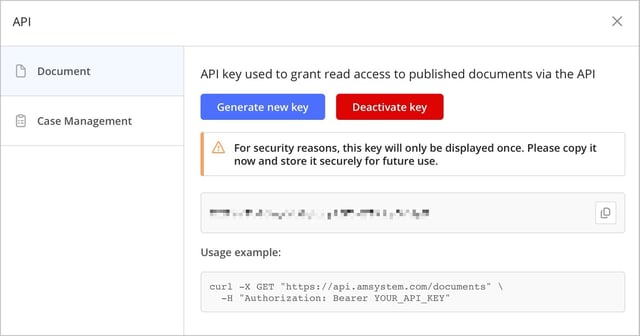
When a key is created, the other administrators in your environment are notified that an API key has been generated. The purpose is to provide transparency and clearly indicate that there is now an API key that grants access to all published documents through the API. This supports internal oversight and helps you maintain a high level of security around access to document information.
It is also possible to deactivate an API key. This may be relevant, for example, if the key is no longer being used, if you suspect it has been shared with unauthorized parties, or if you want to restrict access to the document management system for a period of time for security reasons. When an API key is deactivated, all integrations and external systems using that key immediately lose the ability to retrieve information through the Read API for Documents. Deactivation is therefore an effective way to quickly stop unwanted traffic or temporarily pause an integration, but it should always be planned and communicated internally so that affected system owners and vendors have time to adapt their solutions.
Important information about the API key
Because the API key provides broad access, it is important to clearly define internally who is responsible for the key, where it may be stored, and which systems are allowed to use it.
-
The API key should only be shared with authorized individuals or systems.
-
The API key should be treated as confidential information, in the same way as a username and password.
-
The API key should not be sent through insecure channels or stored in locations where unauthorized parties can access it.
-
The API key should only be used in the systems and integrations where it is actually needed.
-
If you suspect that the API key has been shared with unauthorized parties, you should either create a new key, which makes the previous key invalid, or deactivate the key.
Getting started with API requests
Once the API key has been created, it can be used by the integration or external system that will communicate with Classic.
The technical implementation normally needs to be handled by someone in your organization who works with IT, system integration, or development. This could, for example, be an internal IT department, a system vendor, or another technical partner.
The technical API documentation provides more information about how to make requests, what data can be retrieved, and how the API responses are structured.