
The Concerned by and Reading Receipt features help you identify which documents are relevant to different users and track whether important documents have been read.
These features help you create a more organised management system where users can easily find the documents relevant to their work. At the same time, quality managers and department managers, for example, can check which users have acknowledged reading a document and which have not.
This article explains how the features work, how to configure them, and how users work with Reading Receipts.
Want to learn more about viewing statistics, grouping Reading Receipts, and sending reminders? See also Track Reading Receipts – Statistics, Filtering, Grouping, and Notifications.
What are Concerned by and Reading Receipt?
Concerned by and Reading Receipt are two features that complement each other.
1. Concerned by – identify relevant documents
With Concerned by, you can specify which users are concerned by documents within a particular category. We generally recommend keeping your management system as open as possible so that users have access to the information they may need. However, finding the right information among a large number of documents can be challenging.
Concerned by helps users identify and prioritise the documents that are particularly relevant to their responsibilities.
Concerned by should not be confused with Access.
- Access determines which documents a user is permitted to view.
- Concerned by determines which of the accessible documents are particularly relevant to the user.
A user may therefore have access to many documents but only be concerned by a selection of them. For a user to be concerned by a document, they must also have access to it.
2. Reading Receipt – confirm that documents have been read
Reading Receipt builds on the Concerned by feature and allows you to require concerned users to confirm that they have read a document. A user can be concerned by a document without being required to acknowledge reading it. However, to be subject to a Reading Receipt requirement, the user must be concerned by the document.
This makes it possible to track which users have acknowledged reading a document and which have not.
For a user to be subject to a Reading Receipt requirement, the following conditions must be met:
- The user must have access to the document.
- The user must be concerned by the document.
- Reading Receipt must be enabled for the document.
Reading Receipt is particularly useful for work instructions, safety procedures, quality procedures, and other controlled documents where the organisation needs to verify that relevant employees have read the information.
How to configure Concerned by and Reading Receipt
Concerned by and Reading Receipt are configured at the category level.
Go to Documents » Navigate and locate the category you want to configure.
If you have permission to manage categories, you can hover over the category and click the pencil icon to edit its settings.

Here you will find the Concerned by and Reading Receipt setting.
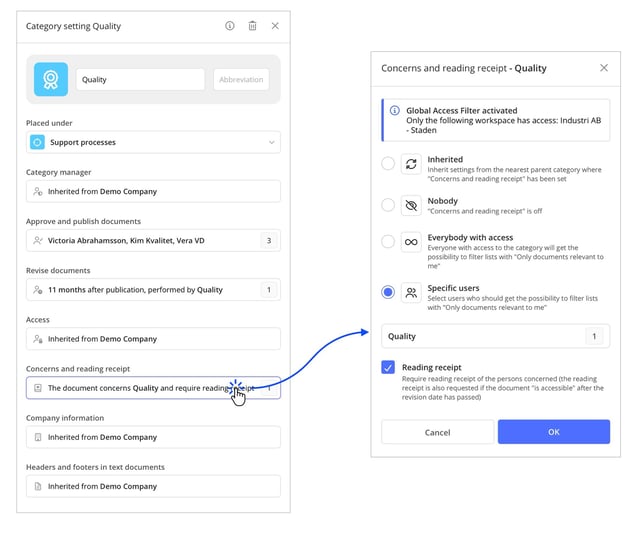
Select which users are concerned
You can choose between different options to determine which users should be concerned by the documents in the category.
-
Everybody with Access: All users who have access to the category will also be concerned by its documents.
-
Specific Users: You can select which users should be concerned by specifying, for example:
-
- Groups
- Departments
- Workspaces
- Individual users
This allows you to tailor which documents are relevant to different parts of your organisation based on users' responsibilities and tasks. For example, documents in a category containing production instructions may concern the production department, while documents in a category containing HR procedures may concern all employees who have access.
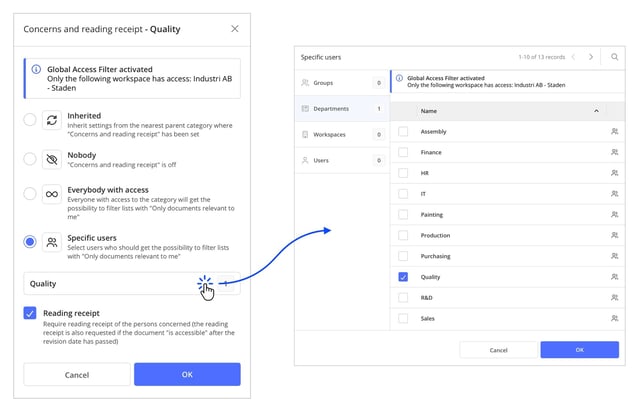
When selecting which users should be concerned, consider who needs the documents in their daily work. This makes it easier for users to identify and prioritise relevant information. The setting does not change users' access permissions – they may still be able to view other documents even if they are not concerned by them..
Enable Reading Receipt
Once you have selected which users should be concerned, you can also enable the Reading Receipt requirement for documents in the category.
The settings apply to documents in the current category and may also affect subcategories that use Inherited settings. It is therefore important to consider how your category structure is organised and which users should be subject to the requirements.
💬 We primarily recommend managing Concerned by and Reading Receipt at the category level. This provides a consistent approach to document management and makes the settings easier to maintain. If an individual document requires different settings from the other documents in its category, you can also customise Concerned by and Reading Receipt for that specific document. Read more in the article: How to manage Concerns and reading receipt per documents
How users find and acknowledge their documents
Show only documents relevant to me
When users go to Documents » Navigate, they can enable the Only documents relevant to me option. When this option is enabled, only documents that concern the user are displayed. Categories that do not contain any documents relevant to the user are greyed out. This makes it easier to navigate a large management system and focus on documents relevant to daily work.
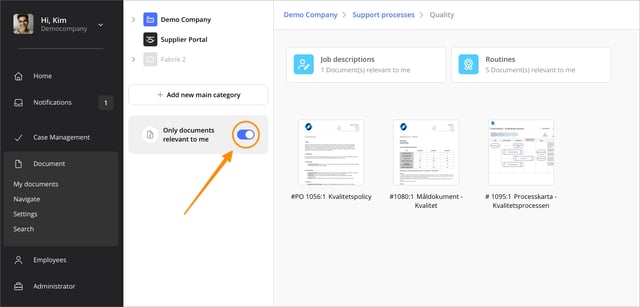
View documents that require a Reading Receipt
Under My Documents » To Do, users will find the Needs a reading receipt by me list. This list contains all documents that the user needs to read and acknowledge. It provides an overview of outstanding Reading Receipts without requiring users to search through the category structure.
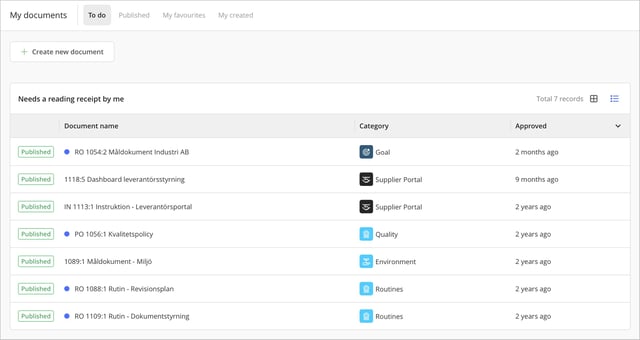
We recommend that users regularly check their list of documents requiring a Reading Receipt as part of their daily work, ensuring that outstanding documents are noticed and read.
Acknowledge reading a document
To acknowledge reading a document, the user opens it and reads its contents. A banner appears above the document, informing the user that a Reading Receipt is required. Once the user has read the document, they confirm this by clicking Reading Receipt in the banner. Simply opening a document does not count as a Reading Receipt.

Exception when publishing a document
The user who approves a document for publication automatically acknowledges reading it. This is because the person approving the document is expected to have read and reviewed its contents before publication. The approval is therefore considered equivalent to a Reading Receipt
Reading Receipt when a document is revised
When a new edition of a document is published, the person approving the document decides whether a new Reading Receipt should be required. If the new edition contains changes that users need to be aware of, requiring a new Reading Receipt may be appropriate.
If the changes are minor and users do not need to read the document again, the approver can choose not to require a new Reading Receipt. In this case, previous Reading Receipts remain valid, and users who have already acknowledged reading the document do not need to do so again. However, users who are subject to the Reading Receipt requirement but have not yet acknowledged the document, such as new users, must read and acknowledge the current edition.
Example
- Edition 1 is published.
- Anna and Bertil acknowledge reading the document.
- Edition 2 is published without requiring a new Reading Receipt.
- Carin, who has not previously acknowledged the document, acknowledges reading Edition 2.
The Reading Receipt overview now shows that Anna, Bertil, and Carin have all acknowledged reading the document.
💬 The Reading Receipt overview may therefore include acknowledgements from several editions when a new Reading Receipt has not been required. Each Reading Receipt is recorded in the document log with a date and time, but only for the edition that the user acknowledged.
In this example, Anna's and Bertil's Reading Receipts are recorded in the log for Edition 1, while Carin's Reading Receipt is recorded in the log for Edition 2.
See which users have acknowledged reading a document
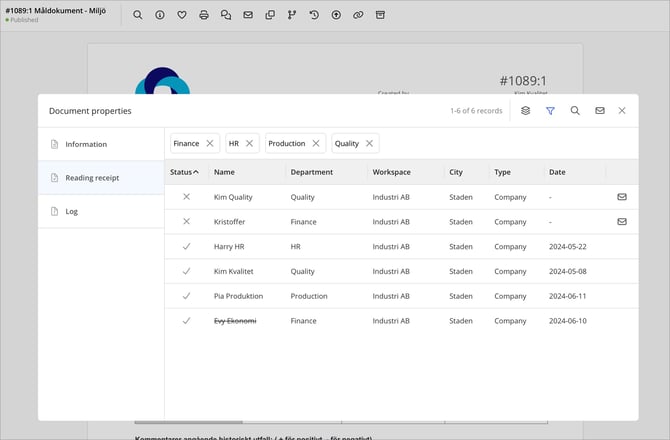
To check which users have acknowledged reading a specific document, open the document and select Show Properties (i). Here you can find information about the document, such as who created, approved, and revised it, which users are concerned by it, and whether a Reading Receipt is required.
Users with the profile setting Access to Reading Receipt Statistics can also access the Reading Receipt tab.
Here you can, among other things:
- See how many users have acknowledged reading the document.
- See how many Reading Receipts are outstanding.
- Check which users have or have not acknowledged reading the document.
- Filter and group Reading Receipts by organisational affiliation.
- Send reminders to users who have not yet acknowledged reading the document.
Want to learn more about using the statistics and the various Reading Receipt follow-up features? See our article: Track Reading Receipts – Statistics, Filtering, Grouping, and Notifications.
Notifications when publishing documents
When a document is published in a category where Reading Receipt is required, no automatic notification is sent to the organisation's users, regardless of whether they are concerned by the document. Users are primarily expected to keep track of their documents under My Documents » To Do.
However, a notification is sent to the document's creator if someone other than the creator approves the document for publication. This notification confirms that the document has been published; it is not a Reading Receipt reminder.
When publishing a document, a banner appears allowing the person publishing it to notify all concerned users. Users can also be notified afterwards using the notification feature in the document's viewing mode. Keep in mind that notifying concerned users does not mean that a Reading Receipt is required. A user can be concerned by a document without being required to acknowledge reading it. Read more in the article: Notify relevant users and alert users about specific documents.
If your purpose is to remind users about outstanding Reading Receipts, we recommend sending targeted reminders to users who have not yet acknowledged reading the documents. You can do this from the Reading Receipt statistics for an individual document or from a search query covering multiple documents. Read more: Track Reading Receipts – Statistics, Filtering, Grouping, and Notifications.
Permissions and history
Who can manage Concerned by and Reading Receipt? o change these settings at the category level, the user must have Override Access.
Who can view Reading Receipt statistics? To access Reading Receipt statistics, the user must have the profile setting Access to Reading Receipt Statistics. This applies both to tracking Reading Receipts for individual documents and to viewing statistics for multiple documents.
Where can I find the Reading Receipt history? Information about when a user acknowledged reading a document is recorded in the document's log. Keep in mind that the log for a particular edition only shows events that occurred in that edition. If a Reading Receipt has been carried over from a previous edition, you may therefore need to review the log for the earlier edition to find the original event.
Tips for working with Concerned by and Reading Receipt
Choose which documents genuinely require a Reading Receipt. Not all documents necessarily need to be subject to a Reading Receipt requirement. Consider which documents are particularly important for safety, quality, and your organisation's working procedures. Using Reading Receipt where there is a clear need makes follow-up more relevant and manageable.
Use Concerned by to simplify document management. In organisations with many documents, Concerned by helps users focus on the documents relevant to their responsibilities. This allows you to maintain a relatively open document structure while making it easier for users to find the information they need.
Review the settings when organisational changes occur. When users change responsibilities, departments, or workspaces, it is a good idea to check that they are still concerned by the appropriate documents. This helps ensure that Reading Receipt requirements remain relevant and that the right users are included in follow-up activities.
Related content
- Notify relevant users and alert users about specific documents
- Track Reading Receipts – Statistics, Filtering, Grouping, and Notifications
- How to manage Concerns and reading receipt per documents.
- What is placed under My Documents
- What does overriding access mean in the document module in AM System?
- User Permissions for Documents via Profile