
The Comment feature allows users to provide feedback on published documents, for example, when an instruction needs clarification, information needs updating, or something could be improved. These comments can then be used as a reference during the next revision and viewed directly in the new draft, without having to open the previous published edition.
Permissions
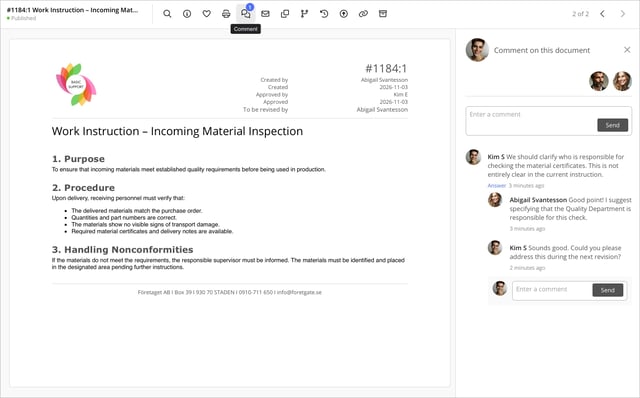
To comment on a published document and view comments both on the published document and in a subsequent draft, users must have the profile setting Comment and View Comments on Published Documents enabled.
If you do not have this permission, contact the person responsible for managing users and profiles in your organisation.
Add a comment to a published document
- Open the published document.
- Click Comment (the speech bubble icon) in the menu. The Give Feedback on the Document panel opens on the right.

- Enter your comment in the Write a Comment field and click Send.
- To reply to an existing comment, click Reply below the comment.
Please note that comments on published documents are visible to all users who have the Comment and View Comments on Published Documents profile setting enabled, regardless of who created the document or submitted the comment.
If a document has comments, a number appears next to the comment icon. This number indicates the number of comment threads, not the total number of individual comments.
Notifications about new comments
The document's creator and approvers always receive a notification when someone comments on a published document. The notification allows them to read the comment even if they do not have the Comment and View Comments on Published Documents profile setting enabled. This ensures that the creator and approvers are made aware of new feedback that may be useful during the next revision.
View comments from the previous edition
When you create a new edition of a published document, comments from the previous published edition become available in the new draft.
You can view these comments when opening or editing the draft, as well as when the draft has been submitted for review. This allows you and the document's reviewers to easily refer to earlier feedback and take it into account during the revision process.
Comments from the previous edition are read-only in the draft. You cannot reply to these comments or add new comments to the existing threads from within the draft.
When opening the draft
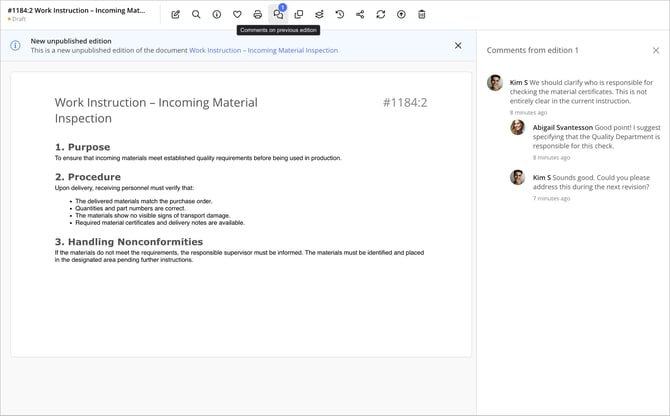
- Open the draft. The number of comment threads from the previous edition is displayed next to the Comments on Previous Edition button.
- Click Comments on Previous Edition.
- A panel opens on the right, displaying the comments along with information about which edition they belong to.
- Close the panel using the X when you are finished.
When editing the draft
When editing the draft, click the comment icon to open the comments from the previous edition.
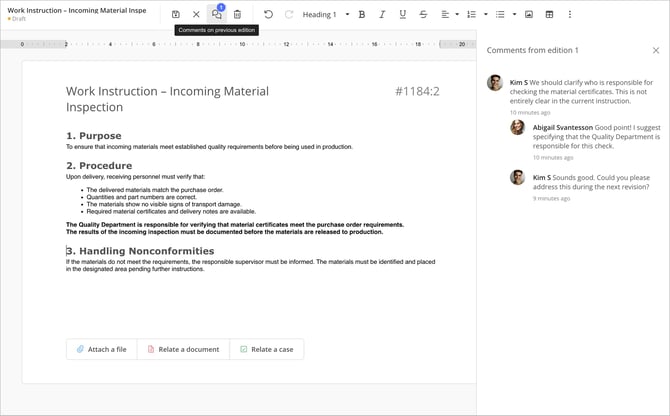
The panel appears alongside the document content while you work. This allows you to review earlier feedback and make any necessary changes directly in the draft.
When the draft has been submitted for review
Comments from the previous edition can also be viewed after the draft has been submitted for review. This allows reviewers to see earlier feedback and take it into account when reviewing the document.
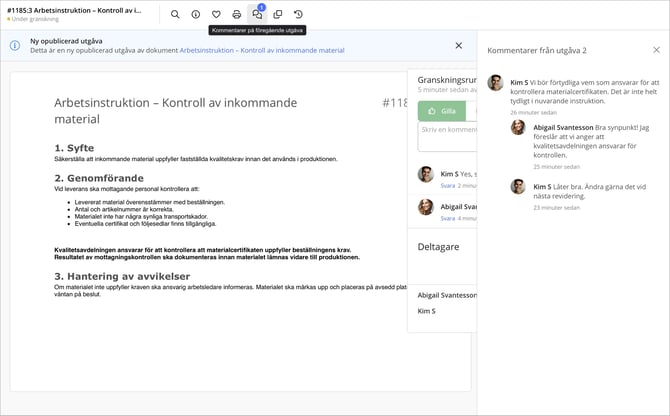
Read more about submitting a document for review in the article: Send for Review
Frequently asked questions
Can I reply to comments from the published document in the draft? No. Comments from the previous published edition can only be viewed in the draft and during review. You cannot reply to them there. If you want to discuss the current draft, use the draft's separate commenting feature, which becomes available when the draft has been shared with at least one person using the Share/Collaborate feature. Feedback related to the review should be submitted through the review feature.
Why doesn't the number next to the comment icon match the total number of comments? The number next to the comment icon indicates the number of comment threads, not the total number of comments and replies. For example, a comment with two replies counts as one comment thread.
Which comments are displayed in the draft? The draft displays comments from the published edition on which the current draft is based.