
Submitting a document for review is optional and not a requirement of the system. You can initiate the review process by selecting the "Send for Review" option from the menu.

When initiating a review round
During a review round, the document is locked for edits, allowing the selected participants to review the content without the risk of any changes being made.
Reviewers have the option to either Like or Dislike of the document (1) and can also provide comments(2) for further feedback.

Evaluations and comments made during the review will be visible to all users who have access to the document, not just those involved in the review round, as long as the document remains under review.
View comments from previous edition
If the draft is a new edition of a published document, you can view comments from the published edition even while the draft is under review. This helps you understand the feedback behind the revision and assess whether it has been addressed.
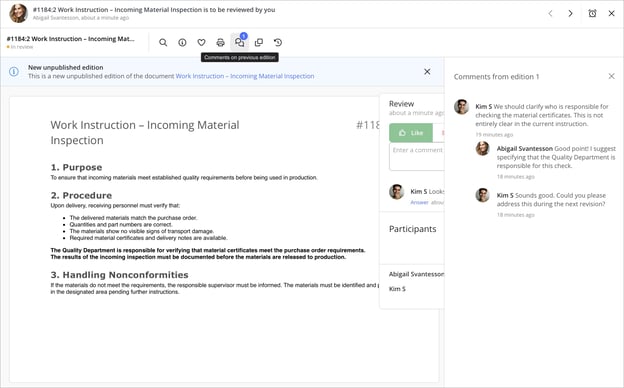
- Open the document that is under review. The comments icon in the menu shows the number of comment threads from the published edition.
- Click the Comments on previous edition icon. The Comments from edition X panel opens on the right.
- When you are finished, click the X to close the panel.
Comments from the published edition are read-only. To share your own feedback on the draft, use the review round as usual. To view comments from the published edition, you need the Comment and view comments on published documents profile setting enabled.
After the review process is complete
The user who initiated the review can choose to Change content after the review is complete, which will cancel the review process, allowing for any adjustments to be made. If no changes are necessary, the user can instead opt to Publish the document. The dialog shown below will appear in the notification sent when feedback is received on the document.
It is entirely possible to conduct multiple review rounds within the same version before publishing.

Access information about review rounds after they have been completed.
Users with permission to view the log in Document properties can access information about the review round after it has been completed, regardless of whether the review was canceled or the document was published following the review.

❗Please note:
- If you have chosen to include the Reviewed by information in the header of your documents, the names of users who clicked "Like" during the review round will be displayed there. However, this will only occur if the review round results in the document being published. If the review round is canceled, you will need to conduct a new round to include reviewer information in the header.
- Additionally, if the document was shared with other users before the review round started, anyone with access to the shared document can also cancel the review process. If the document was not shared prior to the review round, only the user who initiated the review will have the ability to cancel it or submit the document for publication.