
Please note❗
The AM System is unable to provide usernames or reset passwords.
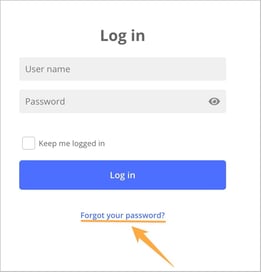
If you are missing login credentials or have forgotten your username or password, your first step should be to use the Forgot your Password? feature found on the login page.
If your organization has not enabled the Forgot your Password? function, or if you do not receive an email with reset instructions, it is advisable to contact an administrator within your organization. They can assist you in regaining access by, for example, manually setting a new password.
 Password Reset
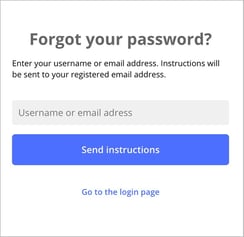
If your organization has enabled the Allow users to reset their password via email feature, you can use it from the login page. Simply enter your username or email address to receive instructions. If you provide a username associated with a valid email address, or if the email address you entered is registered to a single user, you should receive an email with the next steps.
Please be aware that, for security reasons, the system does not provide information regarding incorrect usernames or email addresses when you attempt to reset your password. This measure is in place to protect user accounts and prevent unauthorized individuals from confirming account details.
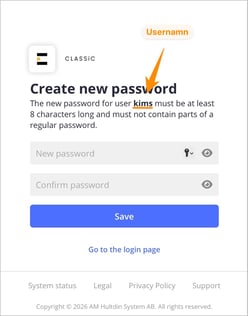 When you click the link in the email to reset your password, a web page will open where you can enter your new password. You need to enter the password twice to confirm that it has been typed correctly. The password must contain at least 8 characters and may not include parts of commonly used passwords. If you have trouble creating a new password, you can find more information here.
Please note that the username associated with the account is not necessarily the same as your email address, even if you used your email address to request the reset. For this reason, the dialog also shows which username is linked to the account.
Once you have chosen a new password and saved the change, you can log in again using the details shown.
I have not received any email with instructions.
If you have not received an email with password reset instructions, several factors may be at play.
- First, ensure that you entered the correct username or email address, as this is essential for the system to send you the reset instructions.
- If you provided an email address associated with multiple users, the system will be unable to send a reset email because it cannot determine which specific user should receive the information.
- If you do not receive an email within a few minutes, please check your spam or junk folder, as it may have been filtered there. If you still cannot find the reset instructions, it is recommended that you reach out to an administrator within your organization for further assistance.