
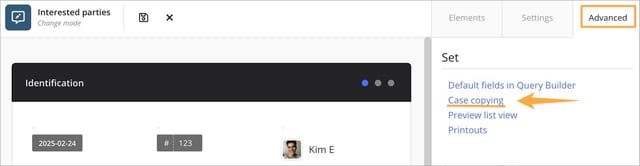
To enable the copying feature, first activate it in the form under Advanced » Case copying. Once the feature is enabled, you then select, step by step, which fields should be included in the copy – for example description, root cause analysis, proposed actions, responsible person, priority, or other relevant information. Only the fields you select will carry their content into the new case, allowing you to control whether the copy should be almost complete or function more as a basic template.
This makes it easy to quickly create new cases based on recurring types of deviations, complaints, or improvement suggestions, without having to re-enter all information from scratch each time. When the copying is performed, a completely new case is always created with its own case number and its own case history, ensuring traceability and a clear distinction between the original and the new registration.
Fields that you do not select for inclusion in the copy will be left empty in the new case. This allows you to enter fresh information in those fields as needed.
Create a copy of the case
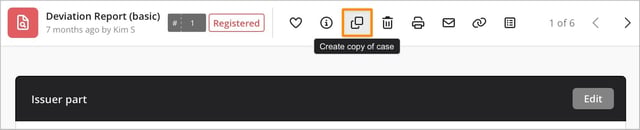
Once you have defined which fields should be included when copying, a copy icon appears on all cases that use the selected form. The icon is shown in the case toolbar, alongside options such as Show activity and delete.
To create a copy, open the case you want to use as a starting point and click the copy icon. The system will then generate a new case where the selected fields are automatically populated with information from the original, while any other fields remain empty for new data entry. After that, you handle the copied case just like any other case.
💬 Note:
-
Please note that triggers for conditional events are not executed when a case is copied, even if their conditions are met. For example, no notification add-ons or other add-ons that would normally run when a case is created or when specific conditions are fulfilled will be sent or triggered solely because of the copy action.
If you want conditional events to run for the new case, you need to trigger them via the normal workflow instead—for example by changing the status, updating one or more fields, or saving the case again, depending on how your triggers are configured. This gives you more control and helps prevent unwanted automated actions when copying many cases at once.
-
This feature cannot be used across different case forms. In practice, this means you can only create a copy within the same form type—for example, you can copy a deviation case to a new deviation case, but not to a different form such as a complaint or an improvement suggestion.
If you need to transfer information between different case forms, this must be done manually instead. This ensures that each form keeps its own structure, fields, and rules, and prevents incorrect or incomplete data from ending up in the wrong type of case.
Summary
This feature is designed to make it easier to reuse information from an existing case. When you create a new case using the form, the fields you have chosen to include are automatically populated with data from the original case.
Relaterat innehåll: