
Classic does not currently have a specific function for sending a welcome message or invitation to new users directly from the system.
For individual new users, you can manually copy the user details and send an email to each person. However, if you are adding several new users, this can quickly become time-consuming. In that case, you can use an alternative approach, provided that the Allow users to reset their password via email function is enabled.
When this function is enabled, any user with a unique and valid email address specified in AM System can reset their own password. This is mainly used when an existing user has forgotten their password but still has access to their email. However, you can also use the same function to simplify onboarding of several new users at once, so you do not need to send individual emails with usernames and passwords to each person.
Instead, you can send a general welcome email to the new users and direct them to the password reset link.
How it works
Start by creating the new users in Classic as you normally would, including for example:
-
First and last name
-
Email address
-
Username
-
Password
-
The password can be a temporary one that you do not need to share with the user. Since each user will create their own new password via the password reset function, you do not need to record or store the temporary password.
-
-
Profile affiliation
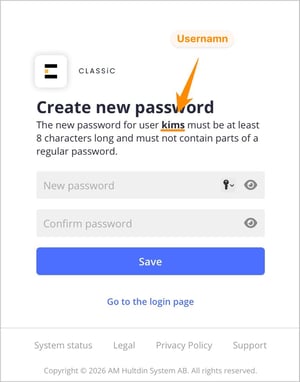 After that, you can send a general email to all new users with instructions and a link to the password reset page. On this page, the user is asked to enter their email address.
The user will then receive an email with further instructions and can set a new password themselves. When the new password is created, the user’s username is also displayed. It can be helpful to mention this, especially if you are not using the user’s email address as their username.
This means that as long as you have entered valid, unique email addresses for the new users, you can send one general email to everyone without having to include individual login details for each person.
Important prerequisites
For this approach to work, the following conditions must be met:
-
The Allow users to reset their password via email function must be enabled.
-
Each user must have a valid and unique email address specified on their user in Classic.
-
The user must have access to the email address registered for their account.
Example email to a new user
Below is an example of a general email you can send to new users. Remember to update the links so that they point to your own Classic site.
Hello,
You have been given an account in Classic, our management system.To get started, you first need to create your own password. You can do this by going to the start page and clicking Forgot your password, or by using this link:
https://*****.amsystem.com/login/recover/
Enter your email address and then follow the instructions in the email that is sent to you. Make sure you use the same email address that this message was sent to. If you do not receive an email, please check your spam folder.
When you create your new password, your username will also be shown.
Once your password is set, you can log in to Classic using this link:
https://*****.amsystem.com
If you have any questions or experience problems logging in, you are welcome to contact us.
Best regards,
[First name Last name]