
Why do we recommend a random subdomain?
As part of our security best practices, new customers can no longer use company names in subdomains. This protects your corporate identity and prevents anyone from identifying which organizations are using our platform based on the web address. For this reason, new subdomains are generated randomly with two letters and three digits (e.g., ab123.amsystem.com).
What is a subdomain?
A subdomain is the portion of the web address that appears before amsystem.com (for example, ab123 in ab123.amsystem.com). Only the subdomain can be changed—the primary domain amsystem.com always remains the same.
What happens if we want to change the address?
If your current subdomain contains your company name, you can switch to a new subdomain—either a custom choice or a randomly generated one. However, we strongly recommend opting for a randomly generated subdomain for maximum security.
Will our existing links be affected?
No, your previous address will remain active even after a new subdomain is set up. This ensures that public forms, registration links, and similar resources will continue to function as before.
Important to note
If you update your subdomain, you need to update your Entra ID configuration. This defines which addresses users can log in from, so remember to add the new subdomain to maintain login functionality.
Recommended order for a smooth domain change
Choose your new address
-
Decide which new address you want to use—either a name-based subdomain or a randomly generated one according to our standard.
-
Get back to us with your choice.
We set up the new address alongside the old one
-
We register the new address in your environment while keeping the old address active during a transition period.
-
This ensures that previous communications (for example, notifications) and already shared links continue to work during the transition.
-
Note: At this stage, the new address initially works only for local users. If you use SSO via Microsoft Entra ID, an adjustment is required before SSO login will work via the new address.
Your IT updates the SSO settings in Entra ID
-
Before you communicate the new address to users, your IT department needs to update your Enterprise Application in Microsoft Entra ID.
-
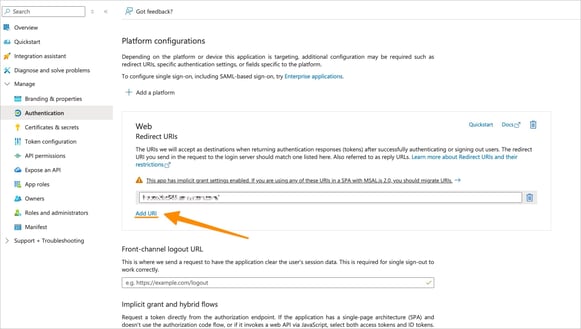
The new address must be added under Redirect URIs.
-
It is important to add the new address without removing the current one in the same step, to avoid disrupting SSO via the old address during the transition.
-
When you later want to retire the old address, it can be removed—but only after you have confirmed that the transition is complete.
Let us know when Entra ID has been updated
-
Once the new address has been added under Redirect URIs, please get back to us.
-
We can then finalize the changes on our side, including updating notifications so that the new address is used. This is important; otherwise, links in notifications may continue to point to the old address.
Change completed
-
When we have carried out the final switch, the new address will be used as the primary address, and the old address can remain as an alternative during the agreed transition period.
What’s the next step?
If you would like to change your subdomain, please contact our support team and we will assist you.