
Before creating a form, we recommend first taking a look at our Webshop, where we offer a wide range of templates completely free of charge. Starting from a ready-made template saves time and reduces the risk of overlooking important fields or questions.
In the Webshop, you will find everything from simple form templates for basic case management to more advanced forms that support processes such as deviation management, complaints handling, risk assessments, internal reporting, and follow-up of actions. These templates are designed to support day-to-day operations with high requirements for quality, traceability, and clear allocation of responsibilities, and they can easily be adapted to your business, your processes, and your terminology.
Each template is structured to support a consistent way of working, whether you work with quality, environmental management, occupational health and safety, or food safety. This makes it easier to collect the right information from the start, follow up on Cases, and work more data-driven with improvements. For example, you can add or remove fields, adjust form logic, and tailor the forms to different roles or workflows within the organisation.
Be sure not to miss the opportunity to explore these valuable tools, which are designed to simplify your work, create structure in your processes, and save time for both you and your colleagues. By choosing a template that closely matches your needs, you can get started more quickly and focus on the content of the work rather than on designing the form itself.
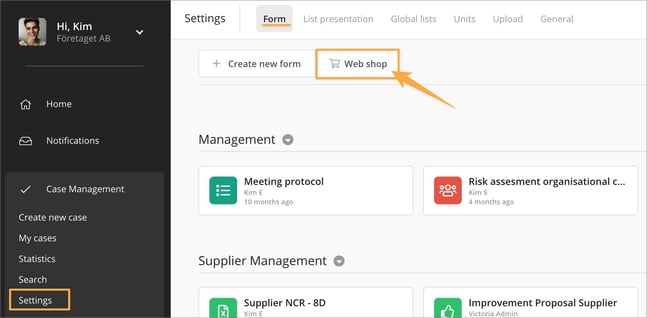
You can find this function under Case Management » Settings » Form, where you can easily open the Webshop, browse the available templates, and choose the one that best suits your needs as the starting point for your next form.
Here, you can search for a template by entering free text or exploring different category titles. Before downloading a template, we recommend previewing it first to ensure it meets your needs.
In the video below, we showcase an example of a form that can be used to report Customer claims with 8D method.